SIM-Blocker & Call-Blocker2.6.0
Publisher Description
Project discontinued
*************************************************
Dual SIM feature is not compatible with Android 10 and later!
Android policies prohibit 3-party apps from accessing SIM information for incoming calls. This means that further development of this key-feature of app is unfortunately no longer allowed.
*************************************************
It occurs a lot of time that we get calls from an unknown number. This kind of situation are not only annoying, but they also waste our time and disturb quiet moments in our life.
Let's be honest, do you also hate unwanted calls and calls like us? We all hate spam and robo-calls! That's why we built an effective SIM blocker app that can stop these unwanted calls.
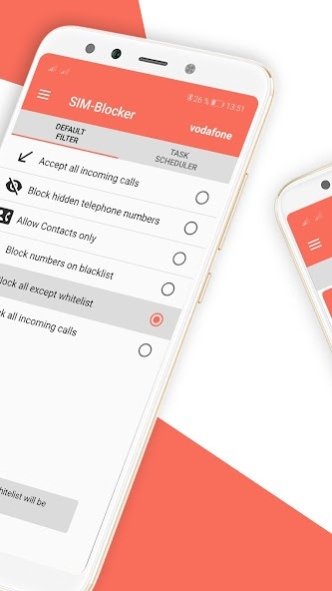
SIM-Blocker is a very simple call blocker application with only one purpose: to block annoying & unwanted calls. SIM Blocker ensures that you are not disturbed by spam callers, unwanted callers or unknown numbers and always receive information about incoming calls.
Just add the number to the blacklist and the app does the rest. At any time you can easily add people to the whitelist and also edit the list of blocked calls.
SIM Blocker is basically a security app that enables many functions:
📴 Dual SIM Call Blocker
SIM Blocker is one of the best call blocking apps on the Play Store because of its dual SIM function. This app is the only Dual SIM app for Android devices. If you have a phone with two SIM cards, you can set your blocking mode for each SIM card separately. This control function is compatible with almost all smartphones starting with Android 7.0.
🕘 Tasks Scheduler
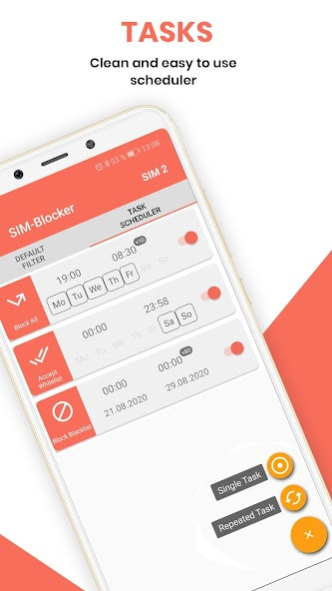
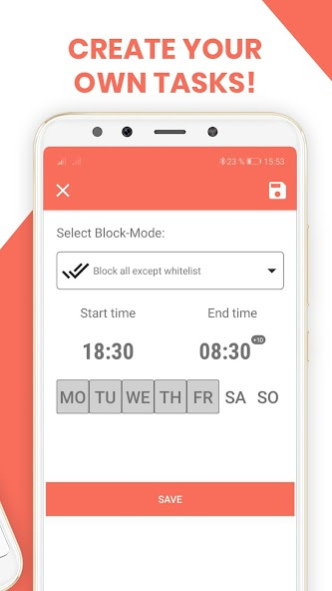
One of the best features of SIM-Blocker is the task planning. You can schedule the blacklist so that calls are blocked only at certain times or you can unblock repetitive tasks for a weekday. For example, call blocking is enabled from 09:00 to 14:00 every Monday & Wednesday. The app schedules the task automatically and you don't have to worry about it anymore.
💬 SMS and Notifications
With this app you can activate automatic SMS and notifications. The app starts automatically in the notification bar. If a call is blocked, you can set to automatically send an SMS and receive a notification for all blocked calls. You can also manually reject incoming calls with an SMS at any time.
SIM Blocker is beautifully designed and easy to use, the free version of SIM Blocker comes with ads. You can remove the ads and get more features by buying the Pro version from Play Store.
Key Features of SIM Blocker App:
✅ Intuitive call interface for incoming & outgoing calls
✅ Block numbers and contacts.
✅ Whitelist is provided to make sure that certain people don’t get blocked.
✅ Blacklist to block the numbers.
✅ Get a notification when a call got blocked.
✅ Activate an auto response SMS on blocked calls.
✅ Do not disturb mode is provided.
✅ Quick and easy setup.
✅ Clean and easy to use scheduler.
✅ Enable repeated tasks.
✅ List of all blocked calls.
✅ The most powerful call blocker app on play store.
✅ Dual SIM call blocker.
We would love to hear from you, kindly rate SIM Blocker app for further improvements.
Thanks for using SIM Blocker app 😍😍
About SIM-Blocker & Call-Blocker
The company that develops SIM-Blocker & Call-Blocker is Siessl.it. The latest version released by its developer is 2.6.0. This app was rated by 2 users of our site and has an average rating of 0.5.
To install SIM-Blocker & Call-Blocker on your Android device, just click the green Continue To App button above to start the installation process. The app is listed on our website since 2020-12-24 and was downloaded 954 times. We have already checked if the download link is safe, however for your own protection we recommend that you scan the downloaded app with your antivirus. Your antivirus may detect the SIM-Blocker & Call-Blocker as malware as malware if the download link to it.siessl.simblocker is broken.
How to install SIM-Blocker & Call-Blocker on your Android device:
- Click on the Continue To App button on our website. This will redirect you to Google Play.
- Once the SIM-Blocker & Call-Blocker is shown in the Google Play listing of your Android device, you can start its download and installation. Tap on the Install button located below the search bar and to the right of the app icon.
- A pop-up window with the permissions required by SIM-Blocker & Call-Blocker will be shown. Click on Accept to continue the process.
- SIM-Blocker & Call-Blocker will be downloaded onto your device, displaying a progress. Once the download completes, the installation will start and you'll get a notification after the installation is finished.
Program Details
System requirements
Download information
Pricing
Version History
version 2.6.0
posted on 2020-12-24
New Feature: Block Calls and add them directly to your blocklist
version 2.5.5
posted on 2020-11-14
* New Text-To-Speech Feature
* Optimized Contact Picker
* New support of french language
version 2.5.3
posted on 2020-11-05
* New Text-To-Speech Feature
* Optimized Contact Picker
version 2.5.0
posted on 2020-10-03
Bug fixes
version 2.4.0
posted on 2020-08-23
version 2.2.1
posted on 2020-06-02
* Bug Fixes
* Fixed Hindi translation
* Voicemail bug fixed
* Number picker for Web
version 2.2.0-r41
posted on 2020-05-28
* Fixed Issue calling numbers with whitespace in it!
* SIM-Card Dialog is now redesigned and even more intuitive!
* Optimized In-Call User Interface & Size for different Screen sized
* Fixed: Under some conditions, the End-Call Button wasn't clickable
* Fixed issue with Call Errors on MIUI Devices
* Bluetooth: If you connect during a Call any Bluetooth Headset Device, SIM-Blocker now detects it and enables it automatically
version 2.1.3
posted on 2020-03-14
* Fixed in call dialpad: Now during a call you can dial numbers (like banking, or call centers)
* Fixed issue of calls without selecting sim slot
version 2.1.2
posted on 2020-03-11
* Fixed issues that App crashed during Call
version 2.1.1
posted on 2020-03-02
* Fixed issue, that some users couldnt get or do any incoming or outgoing call
* NEW: Dark-Theme: One of the big new features of Android 10 is the Dark Theme. Now also SIM-Blocker supports the new Dark-Theme and gives this feature also to users without Android 10. Just go to Settings -> App Settings and change there your "Theme".
* NEW: Created a new Dialer design to do outgoing calls!
* Improved German translation - Thanks FireEmerald for your help
* Fixed some translations issues
